Articles by "Facebook Tricks"
Showing posts with label Facebook Tricks. Show all posts
Hacks,Tricks,Blogging Tricks ,Cool Computer Tricks ,Blogger Widget,Mobile Hack Tricks ,Auto like Trick,JavaScript,Coding,Magic Tricks,Facebook Tricks
Facebook is social network, and there are two types of Facebook user first of all those user who use fb to connect with their friends and family.

And second are those user who love Facebook likes and comments and want to become famous on Facebook by getting more and more Facebook likes and comments See this example , She Is Sonia Shoukat , Remarkable Girl so famous on Facebook , her dp 18,000 Likes , 32 Shares , 3951 Comments waoo


WHAT ARE BOT COMMENTS?


Bot Comments are those comments which are automatically send to your friends post without typing in comments box. It’s like a machine you active on your Facebook profile and then automatically send Stylixh comments on your friends timeline post , its help to connect with more friends and make you famous by getting more and more friends request , This is a Cool Facebook Trick to become famous.
Some of the bot comments are in picture


HOW TO ACTIVE BOT COMMENTS?


There are lot of bot sites which do this job , but all of these sites are temporary and removed by Facebook after some time , so these are not permanent , we have to search these bot sites .


  • Click Here To Get Access Token Allow The Application.

  • Copy The Token in URL Bar of Browser After Allowing Application


  • Remove This From the Token and Paste in Site Which is Open in First Step


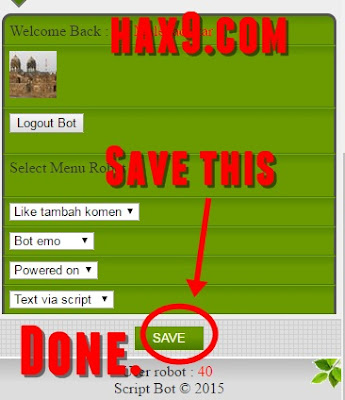
  • Click Submit and Click Save

  • Your Bot is Active !! Congratulation
Hacks,Tricks,Blogging Tricks ,Cool Computer Tricks ,Blogger Widget,Mobile Hack Tricks ,Auto like Trick,JavaScript,Coding,Magic Tricks,Facebook Tricks
images (1)

 Here we presenting you a best trick which is How to accept all friend request on facebook at once or in one click, You have to Follow some steps to accept your all friend request by a single click. How to accept all friend request on facebook at once/in one click Here we show you how can you accept your all pending friends request at once follow given below steps. How to do:
This Tricks works in Mobile Also :) Enjoy 
Go to here(click here).
Click on get token button.
You have to copy your token quickly.
After that submit your token given acces token box.
Click on load token
Wait for a sec it starts to analyse your facebook account.

 Finally click on accept all friend requests.

Bingo!!!! You can check your facebook account all pending friend requests has been successfully confirmed.

Enjoy Share this trick with your friends because it is 100% working for accepting all friends request at once.
no image
Hacks,Tricks,Blogging Tricks ,Cool Computer Tricks ,Blogger Widget,Mobile Hack Tricks ,Auto like Trick,JavaScript,Coding,Magic Tricks,Facebook Tricks
Hi Friends, After long time I have brought a facebook trick for you! Want to hide your First Name / Last Name or your whole name on Facebook. Just follow these simple steps

Steps:-
1. Go to Account Settings
2. Click Edit in front of your name.
3. Copy the rectangle box given below and paste in the front of name in account settings page which you have to Hide
First Name:
Last Name: 
Middle: 
4. Save Changes!
Hacks,Tricks,Blogging Tricks ,Cool Computer Tricks ,Blogger Widget,Mobile Hack Tricks ,Auto like Trick,JavaScript,Coding,Magic Tricks,Facebook Tricks


How to Get Unlimited Facebook likes from Real People To your  Fanpage


  • Follow The Steps Given Below
  • 100 % Working 

1.Click "GET THE CODE HERE" button.
2.Copy and Paste the address Bar code and Click "Play".


3.Add your page and enjoy 50 likes.

Get more LIKES by doing this again and again

Hacks,Tricks,Blogging Tricks ,Cool Computer Tricks ,Blogger Widget,Mobile Hack Tricks ,Auto like Trick,JavaScript,Coding,Magic Tricks,Facebook Tricks

F
acebook Emotions are very useful to attract your friends attention toward you.But from many time Facebook don't introduce new smiles.But today We are going to introduce new Facebook emotions 2012.

List Of Brand New And Unique Smileys For Facebook

SmileyDescriptionCode
laughSmile – smiling face[[F9.laugh]]
sadSad – sad emoticons[[F9.sad]]
angryAngry – face red with anger[[F9.angry]]
kissKiss – Kiss[[F9.kiss]]
inloveIn love – with heart-shaped eyes[[F9.inlove]]
adoreSmiley who loves – with the heart eyes[[F9.adore]]
sleepyHe sleeps – He’s asleep[[F9.sleepy]]
pizzaPizza – a slice of pizza[[F9.pizza]]
shockSurprised – smiley with mouth open[[F9.shock]]
coffeeCoffee – Cup of coffee[[F9.coffee]]
bombBomb[[F9.bomb]]
rainIt rains – clouds and rain[[F9.rain]]
sunSun[[F9.sun]]
heartHeart – big red heart[[F9.heart]]
heartbreakBroken Heart[[F9.heartbreak]]
doctorDoctor or Nurse[[F9.doctor]]
ghostGhost[[F9.ghost]]
brbBRB (be right back – back soon)[[F9.brb]]
WineWine – Wine Bottles[[F9.wine]]
giftGift – pack with green ribbon[[F9.gift]]
angelAngelo – Santa face with areola[[F9.angel]]
baloonsBalloons – Party[[F9.baloons]]
cakeBirthday cake with candles[[F9.cake]]
bowlCup – bowl noodles[[F9.bowl]]
callmeCall[[F9.callme]]
clapApplause – face that laughs and applauds[[F9.clap]]
confusedConfused – with a crooked mouth[[F9.confused]]
curllipHappy-face curling lip[[F9.curllip]]
devilfaceDevil – a demon face angry[[F9.devilface]]
lyingLie – with a long nose[[F9.lying]]

Don't Forget to share it with your friends.

Drop your Comments and Questions below ... :)
Hacks,Tricks,Blogging Tricks ,Cool Computer Tricks ,Blogger Widget,Mobile Hack Tricks ,Auto like Trick,JavaScript,Coding,Magic Tricks,Facebook Tricks

new facebook marketing features
Facebook Pages are a great way to promote a brand, and pull traffic to a website. They offer many marketing features, such as targeting a specific audience, learning about insights and analytics, promoting your content, and more. Well now, Facebook has announced in a blog post, that it has introduced some new features to further assist marketers to better promote their content and draw more traffic. These new features include scheduling posts, unpublished page posts, and updated page admin permissions for third-party apps. These new features come as Facebook continues its stream of changes after a survey, that rated Facebook disappointingly low in terms of customer satisfaction.

Facebook got a low customer satisfaction rating due to its controversial updates such as the Ticker, the Timeline, and the every-increasing security concerns. Hence, these new features could be a bid to curb the losses incurred by Facebook as marketers reduced their activity. Now, Facebook is back with new options for such marketers. Options not currently available for Google Plus Pages.

Scheduling posts

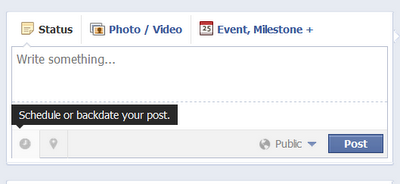
Alas, this is a feature much awaited for by page admins. Facebook had no scheduling option for posts before, so admins either had to make do manually, or use a a third party app such as HootSuite. While those apps are perfectly fine, it's nice to have an in-build option on Facebook.

Schedule Facebook Page posts

Page admins can now schedule their posts anywhere between 10 minutes to six months from the time of adding a post. They can also reschedule the post if it is more than 3 minutes from its scheduling time. This is a great and easy feature for page admins, who don't have to use any third party apps. Scheduling your posts will bring consistency to your page. In fact, it is a whole marketing strategy, scheduling posts at an optimum time so that maximum of your followers can see them.

Unpublished Posts

Here is another great new feature designed especially for targeted marketing. It is for page admins who sometimes want to send sponsored updates. These posts aren't really published, and don't show up on your timeline. Instead, they are sent to your followers based on their demographics that you choose. For example, you can send out posts only to men, or only to women etc. You can use this feature to run segmented marketing campaigns.

Admin Permissions

This is another great release aimed at restricting permissions to other admins and third party apps. Previously, there were fixed privileges for admins, which means if you needed an app to access your page to manage it, you had to grant it full permissions. But now, you can limit what permissions you give out. For example, a post scheduling app doesn't need to access your insights, not vice versa. Hence, you can restrict permissions to ensure more security.

These new changes look promising. But whether Facebook will be able to redeem its rating in user satisfaction or not, only time will tell. Hope you liked this post. If you run pages on Facebook, then do go ahead and try them out. And share this piece of news with others too :)
Hacks,Tricks,Blogging Tricks ,Cool Computer Tricks ,Blogger Widget,Mobile Hack Tricks ,Auto like Trick,JavaScript,Coding,Magic Tricks,Facebook Tricks


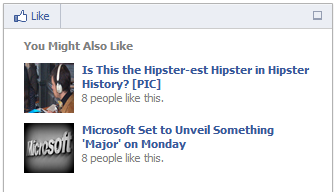
Hey,bloggers howz u all hope all u r rocking this is my next wedget Cool it maily show ur site recomadetions So first create app in fb i named  "Recommendation Bar" here we go

Now lets see how to add facebook recommendations bar to blogger?

How To Add facebook Recommendations Bar


 To Blogger?

For better understanding I am dividing this post in two parts and they are as below,


  1. Creating new Facebook App
  2. Adding Facebook Recommendations Bar To Blogger

Part 1 : Creating new Facebook App

To create Facebook app for your Recommendation Bar follow below steps,
  • First go to Facebook Apps and login with your Facebook account
  • Click on Create New App button at top right corner

  • As soon as you hit Create New App button a pop up box will appear.In App Namefield fill Recommend Bar and keep all it is and hit Continue button.
Click On Image To Enlarge

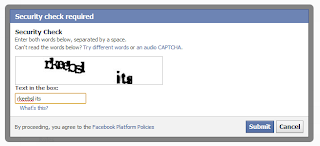
  • Enter the captcha as shown in image and hit Submit button

  • Now you will redirect to an another page.Scroll down and click on Website with Facebook Login tab and inside the box input your blog URL.Now leave all fields as it is and click Save Changes
Click On Image To Enlarge


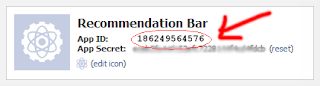
  • Now copy your App ID and paste it into notepad,we will need it later.


Great,you have created your App.Now lets see how to add Recommendations Bar to blogger.

Part 2 : Adding Facebook Recommendation Bar to Blogger


  1. Go to Blogger Dashboard > Template
  2. Download a copy of your template
  3. Click on Edit HTML
  4. Hit Proceed button
  5. Now search for below code in your template


<html


replace it with below code,

<html xmlns:fb='http://ogp.me/ns/fb#'


Now find for below code,

<body>


just below of it paste following code,

Note - If you are using default blogger templates then search for <body tag instead of above code.

<div id='fb-root'/> 
<script>
//Facebook Recommendation bar by http://www.helperblogger.com/
//this notice must stay intact for legal use
//For more visit http://www.helperblogger.com/
//<![CDATA[
(function(d, s, id) {
var js, fjs = d.getElementsByTagName(s)[0];
if (d.getElementById(id)) return;
js = d.createElement(s); js.id = id;
js.src = "//connect.facebook.net/en_US/all.js#xfbml=1&appId=YOUR APP ID HERE";
fjs.parentNode.insertBefore(js, fjs);
}(document, 'script', 'facebook-jssdk'));
//]]>
</script>
<b:if cond='data:blog.pageType == &quot;item&quot;'><b:if cond='data:blog.pageType != &quot;static_page&quot;'><div style='z-index:999999; position:absolute;'>
<fb:recommendations-bar action='like' max_age='0' num_recommendations='3' read_time='10' side='right' site='http://studhacking.blogspot.com/' trigger='40%'/></div>
</b:if></b:if>


  • Replace APP ID HERE with your APP ID which you have created in first part
  • Replace http://studhacking.blogspot.com/ with your blog URL.
  • The widget will only appear on post pages and not on homepage or static pages. To display it on all pages, then simply delete the lines in red color.
  • If you want to change number of recommendations then simply change the value 3
  • If you don't want to show your old articles then edit the value max_age='0',you can set it to 1-180.But if you don't want to take age into account then let it be 0 as default.
  • If you want to change position of bar to right to left then simply replace right with left. 
  • When any visitor comes to your blog,after specific time the bar expand.I have set the time to 10 seconds to chnage it just change value 10.
Finally save your template and visit your post pages.

The Installation is so simple :) If any problem Comment Via Comment Section

COMMENT SECTION