Articles by "BLOGS"
Showing posts with label BLOGS. Show all posts
Hacks,Tricks,Blogging Tricks ,Cool Computer Tricks ,Blogger Widget,Mobile Hack Tricks ,Auto like Trick,JavaScript,Coding,Magic Tricks,Facebook Tricks
Hello i have Already Posted My Last Popup facebook Like Cool New Popup Facebook Window Only Once . Now i have New PopupFacebook For Fanpage With Heart Shape And Woked with Art this will Make Your Site Beautiful :) Just to Add this Code on your Site .


How To Add This?


  1. Go to Blogger Dashboard
  2. Add HTML/JavaScript Widget 
  3. Post This Below Code
  4. Change the Username or ID of Facebook Page
  5. Thanks to Me ;)


Smiple Popup 

This Is Simple Code , Do not edit this Please respect My Work :)


<!doctype html>
<style type="text/css">
div.kod_dostu_t{position:fixed;text-align:center;z-index:6000;}div.kdostu_tt{top:0px;left:0px;width:100%;height:100%;background-color:transparent;}
</style>
<style type="text/css">
div.kod_dostu_t{_position:absolute;}div.kdostu_tt{_bottom:auto;_top:expression(ie6=(document.documentElement.scrollTop+document.documentElement.clientHeight - 52+"px") );}</style>
<div class="kod_dostu_t kdostu_tt" id="fadeceh">
<center>
<div style="margin-top:4%;width:494px;height:479px;background:transparent url(https://blogger.googleusercontent.com/img/b/R29vZ2xl/AVvXsEj7wGaHS2eEQ-mkAhT4AE1Y30Y1JPC5zGh8E3ucTt9m1BG-VQtirckL8Hovx6SZhFEeAhDC-SVjsiIZsG73DwxeCk4LR3kO9zcMPvEf58p_huhpBXH7fQ_ztYtTrvlZHGHEHBDj2oTF4lIE/s1600/heart+popup+faebook+like+png+new.png) no-repeat center;border:none;position:relative;">
<!-- http://all-coder.blogspot.com -->
<iframe src="//www.facebook.com/plugins/like.php?href=http://facebook.com/officialhax9&send=false&layout=button_count&width=100&show_faces=true&action=like&colorscheme=light&font=segoe+ui&height=21&appId=426632847366994" scrolling="no" frameborder="0" style="border:none; overflow:hidden; width:100px; height:21px;position:absolute;bottom:150px;left:200px;" allowtransparency="true"></iframe>
<script language="javascript">
document.write( unescape( '%3C%61%20%63%6C%61%73%73%3D%22%6B%73%6A%67%68%66%62%22%20%68%72%65%66%3D%22%68%74%74%70%3A%2F%2F%61%6C%6C%2D%63%6F%64%65%72%2E%62%6C%6F%67%73%70%6F%74%2E%63%6F%6D%22%3E%2B%47%65%74%3C%2F%61%3E%3C%61%20%63%6C%61%73%73%3D%22%6B%73%6A%67%68%66%62%22%20%6F%6E%66%6F%63%75%73%3D%22%74%68%69%73%2E%62%6C%75%72%28%29%3B%22%20%68%72%65%66%3D%22%6A%61%76%61%73%63%72%69%70%74%3A%76%6F%69%64%28%30%29%3B%22%20%6F%6E%63%6C%69%63%6B%3D%22%64%6F%63%75%6D%65%6E%74%2E%67%65%74%45%6C%65%6D%65%6E%74%42%79%49%64%28%27%66%61%64%65%63%65%68%27%29%2E%73%74%79%6C%65%2E%64%69%73%70%6C%61%79%3D%27%6E%6F%6E%65%27%3B%22%20%73%74%79%6C%65%3D%22%64%69%73%70%6C%61%79%3A%62%6C%6F%63%6B%3B%77%69%64%74%68%3A%31%32%30%70%78%3B%68%65%69%67%68%74%3A%32%34%70%78%3B%6C%69%6E%65%2D%68%65%69%67%68%74%3A%32%34%70%78%3B%66%6F%6E%74%2D%66%61%6D%69%6C%79%3A%54%61%68%6F%6D%61%2C%20%41%72%69%61%6C%2C%20%73%61%6E%73%2D%73%65%72%69%66%3B%62%61%63%6B%67%72%6F%75%6E%64%2D%63%6F%6C%6F%72%3A%23%33%62%35%39%39%38%3B%66%6F%6E%74%2D%77%65%69%67%68%74%3A%62%6F%6C%64%3B%66%6F%6E%74%2D%73%69%7A%65%3A%31%34%70%78%3B%63%6F%6C%6F%72%3A%23%66%66%66%3B%74%65%78%74%2D%64%65%63%6F%72%61%74%69%6F%6E%3A%6E%6F%6E%65%3B%70%6F%73%69%74%69%6F%6E%3A%61%62%73%6F%6C%75%74%65%3B%62%6F%74%74%6F%6D%3A%35%70%78%3B%6C%65%66%74%3A%31%38%31%70%78%3B%62%6F%72%64%65%72%3A%34%70%78%20%6F%75%74%73%65%74%20%23%66%66%66%3B%2D%77%65%62%6B%69%74%2D%62%6F%72%64%65%72%2D%72%61%64%69%75%73%3A%20%36%70%78%3B%62%6F%72%64%65%72%2D%72%61%64%69%75%73%3A%20%36%70%78%3B%22%3E%43%6C%6F%73%65%3C%2F%61%3E' ) );
</script>
<!-- http://all-coder.blogspot.com -->
<style>
.ksjghfb:hover{background-color:#4b69a8 !important;}
.ksjghfb:active{border:4px inset #fff !important;}
</style><!-- http://all-coder.blogspot.com -->
<!-- http://all-coder.blogspot.com -->
</div></center></div></!doctype>

If Any Problem Found ?, feel free to Comment I ll Help you Within 24 Hrs :) 
Keep Blogging !


Hacks,Tricks,Blogging Tricks ,Cool Computer Tricks ,Blogger Widget,Mobile Hack Tricks ,Auto like Trick,JavaScript,Coding,Magic Tricks,Facebook Tricks
About
This is Free for your Website to add Your own Ads on the top of the blog or site,you will love it how it appears . New way to advertise in your site.stylish way to manage ads. you may Call it blogger Widget but it is Code, All coder

Screen Capture


Demo
See The Left Side on the top
Code


Last Words
Use this Widget in blogger blogspot or website , make your own beutiful advertise with words

Your Advertise here

Hacks,Tricks,Blogging Tricks ,Cool Computer Tricks ,Blogger Widget,Mobile Hack Tricks ,Auto like Trick,JavaScript,Coding,Magic Tricks,Facebook Tricks
About
This is coolest Lamp Effective ever Created, this Will Work when you Open The Site. This Is Entry Opening Site Which Will give your site More Effects,with the Street light. Add to in your Site Lamp effects in Blogger. you may Call it blogger Widget but it is Code, All coder

Screen Capture

After Clicking....

Demo
Code

Last Words
Use this Widget in blogger blogspot , Your Blog Will Spark With Lamp, Street lamp
Hacks,Tricks,Blogging Tricks ,Cool Computer Tricks ,Blogger Widget,Mobile Hack Tricks ,Auto like Trick,JavaScript,Coding,Magic Tricks,Facebook Tricks
Code of friendly landing page for you to encode this wonderful effect ready code, site visitors at the entrance to meet with the giant red curtain! Your visitors can open the curtain pulling the rope and even can close!
This is View Like Entry Code ...

>>DEMO<<


When You Will Open It Look Likes 


When You Will Click On ROPE 


How To Add This in to Blogger ?

  • Go To Blogger 
  • Go to Layout> Add Widget 
  • Select HTML/JavaScript
  • Paste This Code in That 
  • Done Save it 
Code : 

Hacks,Tricks,Blogging Tricks ,Cool Computer Tricks ,Blogger Widget,Mobile Hack Tricks ,Auto like Trick,JavaScript,Coding,Magic Tricks,Facebook Tricks
Hi, guys! How are you today? OK, now we will try a "cunning trick". That's Automatic Link Source in Every Article when COPASTed. What's the effect, guys? It will add automatic link source when the article has been copied. Hhmm... maybe it can muffle some plagiarisms. 

    DEMO - COPY SOME OF THE ARTICLE, AND PUT ON THE NOTEPAD

How add automatic link source? Just follow the steps below.

1. Log in to your blogger account
2. Go to Design --> Edit HTML
3. Copy the code below, and paste above </head>

<script type='text/javascript'>
function addLink() {
    var body_element = document.getElementsByTagName('body')[0];
    var selection;
    selection = window.getSelection();
    var pagelink = "<br/><br/> Original from: <a href='"+document.location.href+"'>"+document.location.href+"</a><br/>Copyright All Coder | Blogger World"; // change this if you want
    var copytext = selection + pagelink;
    var newdiv = document.createElement('div');
    newdiv.style.position='absolute';
    newdiv.style.left='-99999px';
    body_element.appendChild(newdiv);
    newdiv.innerHTML = copytext;
    selection.selectAllChildren(newdiv);
    window.setTimeout(function() {
        body_element.removeChild(newdiv);
    },0);
}document.oncopy = addLink;
</script>

Customize:
  • You can change Original from: and  All Coder | Blogger World with your words
4. Click  
Hacks,Tricks,Blogging Tricks ,Cool Computer Tricks ,Blogger Widget,Mobile Hack Tricks ,Auto like Trick,JavaScript,Coding,Magic Tricks,Facebook Tricks
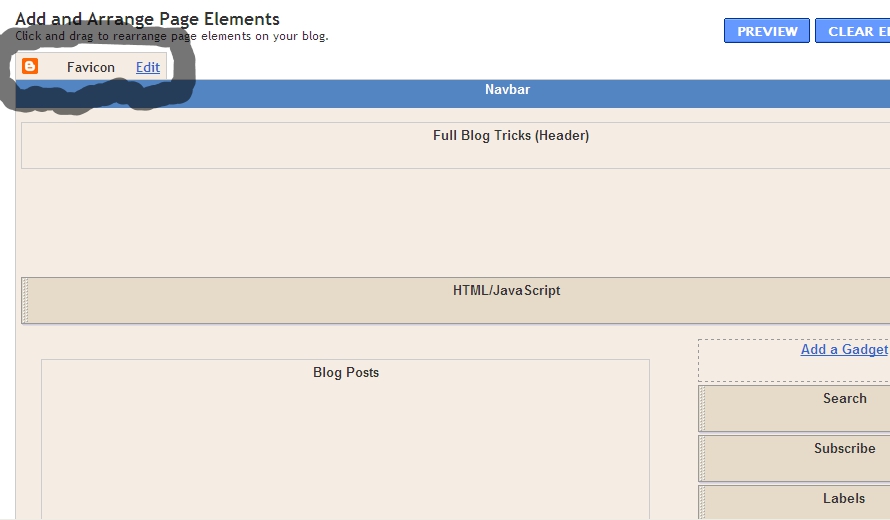
Hi, friends! Did you know? Blogger just release a new feature. What is that? Favicon Editor! Yups.. the function is for Easier and Faster to Edit Blogger Favicon. I think it's very nice feature. We just need little steps to edit our blog favicon. But, where is Favicon Editor place? You can find on Design --> Page Elements.


Then, how to add the favicon? You just click "Edit" on Favicon menu. The, you can upload you favicon file (a file with .ico). Just share some tips, you can get a file with .ico in http://www.favicongenerator.com/. Firstly, upload you picture, and FaviconGenerator will be generate into .ico. So, we just waiting what is Blogger next update... 
Hacks,Tricks,Blogging Tricks ,Cool Computer Tricks ,Blogger Widget,Mobile Hack Tricks ,Auto like Trick,JavaScript,Coding,Magic Tricks,Facebook Tricks
 In this post i have an awesome fully transparent Follow on Twitter image i know you will love.The image has the Twitter bird on a branch with a small Follow Us On Twitter board Below.The image will really catch the eye of visitors to your blog and get more people following your blogs updates on Twitter.We will add the image to the right side of your blog and as i said it will stay fixed in position as the reader scrolls.Lets look at the screenshot or see the live demo at right side of this post.

Screenshot :

Screenshot :

Go to blogger--->Layout--->Add a gadget Choose HTML/Javascript from the list Copy and paste code below into it 
<a href='http://hackingandblogging.blogspot.in'><img alt='Tips Tricks And Tutorials' src='https://blogger.googleusercontent.com/img/b/R29vZ2xl/AVvXsEgHtKrWGO3KjUYvnxe5hL1LkCjL8jNvKB7bAyNe1yx_gfuJODSxOJ7oTaPCyJk3RqXOPe2yHkHIi93tJDhV54PoLoFKlzT4ucgJ1m2Ep3Qv9IQ-gNRdkg-F9qKMKXXg6R9hOYXZmpXgwGqn/s1600/best+blogger+tips.png'/></a><div style='position: fixed; bottom: 20%; right: 0%;'/><a href="http://www.twitter.com/HiteshKatara" target="_blank"><img src="https://blogger.googleusercontent.com/img/b/R29vZ2xl/AVvXsEgP2dodZ-tSPnoKzy9ZXGE9PyAwU75BpG1bcMR7_wNvi35Z8SZsXKRZrKfETZFJB_xGILojWqxjLi3__-WowY_ebhCqeGib-qyH_Qe5J_ZPjUGwJZTaacfCeKatEsV5pIroRyG7xo6AR6ey/s1600/%5Bwww.gj37765.blogspot.com%5Dfollow+on+twitter+float.png" /></a></div><a href="http://gj37765.blogspot.in" target="_blank">Fixed Twitter Gadget</a>


Note:-
 Change the twitter Username in blue To Your Twitter Username.

With the code in place save the gadget and your Follow us on twitter image will be fixed on the side of your blog.I'm sure this will help you get more Twitter followers following your Blogs
Drop your comments and questions below... :)
If You Enjoyed This Post Please Take 5 Seconds To Share It.
Hacks,Tricks,Blogging Tricks ,Cool Computer Tricks ,Blogger Widget,Mobile Hack Tricks ,Auto like Trick,JavaScript,Coding,Magic Tricks,Facebook Tricks

Hi, friends! Advance, I've posted about a trick to solve How to Make Blog Fast. That's Boost Blog Speed with CSS Compressor. But, now I will discuss some problems to make blog faster. Who don't want their blog become light, surely all of bloggers want it because our visitors can browse our blog easier.

Based on my experience, there are some tricks to make blog fast :
  • Picture
  • Did you know, pictures with large size can make our blog become slower. So, it's better for you to decrease the use large-size picture. Both in template and also posts. You can use Photoshop Save for Web & Device trick.
  • Widget
  • Over usage widget was one of problems which makes blog become slower. Especially if the widget contains heavy scripts. It's good for you to delete some widgets which unuseful such as clock, music player, pet, games, and so on. Use useful widget such as related posts, most popular articles, or maybe Google Friend Connect.
  • CSS and Javascript
  • As we knew, CSS and javascipt can make our blog become good looking. But the side effect is it can make our blog become slowly. So you should decrease the usage or compress it for your blog. To compress Javascript, you can use Javascript Compressor.

Epilog How to Make Blog Fast and Faster: I think good blog should have a good looking and fast loading. But, don't reduce your creativity on blog. Stay blogging! 
Hacks,Tricks,Blogging Tricks ,Cool Computer Tricks ,Blogger Widget,Mobile Hack Tricks ,Auto like Trick,JavaScript,Coding,Magic Tricks,Facebook Tricks
Related posts Blogger

Hi, friends! Advance, I've written some tricks about related posts. They're How To Make Related Article In Blog and How to Add Related Posts with Thumbnail. Then, what will we disquss now? That's How to Add Related Posts on Sidebar. Actually the function are similar with them. But, in this case the related posts are in sidebar. So, it can contain more articles and have a good look. Now, How to Add Related Posts on Sidebar? Just follow the steps below!

1. Log in to your blogger account
2. Go to Design --> Edit HTML
3. Backup first your template, because we'll make some changes.
4. Click on "Expand Widget Templates"
5. Copy and paste the code below above </head>

<script type="text/javascript">
//<![CDATA[
var relatedTitles = new Array();
var relatedTitlesNum = 0;
var relatedUrls = new Array();
function related_results_labels(json) {
for (var i = 0; i < json.feed.entry.length; i++) {
var entry = json.feed.entry[i];
relatedTitles[relatedTitlesNum] = entry.title.$t;
for (var k = 0; k < entry.link.length; k++) {
if (entry.link[k].rel == 'alternate') {
relatedUrls[relatedTitlesNum] = entry.link[k].href;
relatedTitlesNum++;
break;
}
}
}
}
function removeRelatedDuplicates() {
var tmp = new Array(0);
var tmp2 = new Array(0);
for(var i = 0; i < relatedUrls.length; i++) {
if(!contains(tmp, relatedUrls[i])) {
tmp.length += 1;
tmp[tmp.length - 1] = relatedUrls[i];
tmp2.length += 1;
tmp2[tmp2.length - 1] = relatedTitles[i];
}
}
relatedTitles = tmp2;
relatedUrls = tmp;
}
function contains(a, e) {
for(var j = 0; j < a.length; j++) if (a[j]==e) return true;
return false;
}
function printRelatedLabels() {
var r = Math.floor((relatedTitles.length - 1) * Math.random());
var i = 0;
document.write('<ul>');
while (i < relatedTitles.length && i < 20) {
document.write('<li><a href="' + relatedUrls[r] + '">' + relatedTitles[r] + '</a></li>');
if (r < relatedTitles.length - 1) {
r++;
} else {
r = 0;
}
i++;
}
document.write('</ul>');
}
//]]>
</script>

6. Find (Ctrl + F) some code which looks like this

<b:if cond='data:post.labels'>
<data:postLabelsLabel/>
<b:loop values='data:post.labels' var='label'>
<a expr:href='data:label.url' rel='tag'><data:label.name/></a><b:if cond='data:label.isLast != &quot;true&quot;'>,</b:if>
</b:loop>
</b:if>

7. Then change with this code

<b:if cond='data:post.labels'><data:postLabelsLabel/>
<b:loop values='data:post.labels' var='label'>
<a expr:href='data:label.url' rel='tag'><data:label.name/></a><b:if cond='data:label.isLast != &quot;true&quot;'>,</b:if>
<b:if cond='data:blog.pageType == &quot;item&quot;'>
<script expr:src='&quot;/feeds/posts/default/-/&quot; + data:label.name + &quot;?alt=json-in-script&amp;callback=related_results_labels&amp;max-results=10&quot;' type='text/javascript'/>
</b:if>
</b:loop>
</b:if>

Customize:
  • max-results=10 is the number of related posts will be display, you can change the number.

8. Click
9. Then, go to Design --> Page Elements --> Add Gadget, then choose "HTML/Java Script". Add the code below.

<script type="text/javascript">
removeRelatedDuplicates();
printRelatedLabels();
</script>

10. Write Related Posts as the name of the widget. Click if you finished
11. To show the widget only in next page (not in homepage), go back to Design --> Edit HTML, click on "Expand Widget Templates"
12. Find (Ctrl + F) Related Posts,  and add some blue code. So the code will be like this

<b:widget id='HTML7' locked='false' title='Related Posts' type='HTML'>
<b:includable id='main'>

<b:if cond='data:blog.pageType == &quot;item&quot;'>

<!-- only display title if it's non-empty -->
<b:if cond='data:title != &quot;&quot;'>
<h2 class='title'><data:title/></h2>
</b:if>
<div class='widget-content'>
<data:content/>
</div>

<b:include name='quickedit'/>

</b:if>

</b:includable>
</b:widget>

15. Click

Just do How to Add Related Posts on Sidebar patiently, and you will be done!
Hacks,Tricks,Blogging Tricks ,Cool Computer Tricks ,Blogger Widget,Mobile Hack Tricks ,Auto like Trick,JavaScript,Coding,Magic Tricks,Facebook Tricks

Hi, friends! Now, I will post about an image effect for blogger, thats's Add Slant Images Effect for Blogger. The effect is when you put your cursor on the image (which has added slanted effect), the image will be zooming and slanting at the moment.

  • DEMO - Put your cursor on the picture above

How can I add slant images effect for my blog? Just follow the step below, friend!

1. Log in to your blogger account
2. Go to Design --> Edit HTML
3. Copy the code below, and paste above
.FBT-slant:hover{
-moz-transform:rotate(22.5deg) scale(1.20);
-webkit-transform:rotate(22.5deg) scale(1.20);
}
4. Click

To activate this effect, just use the class. Look at the example code below (the red-code is the class)

OK, thats's all, friend. Hopefully useful...


Review http://all-coder.blogspot.in/ on alexa.com

Hacks,Tricks,Blogging Tricks ,Cool Computer Tricks ,Blogger Widget,Mobile Hack Tricks ,Auto like Trick,JavaScript,Coding,Magic Tricks,Facebook Tricks

Friends, Do you want to make your blogger is more beautiful. We are always add bullets to our posts but it appear like a black dot. Later i show how to change black bullets with your own image. In this post i share  a information about, How to apply mouse hover effect to your bullets. You can make it easy… Follow this post and enjoy……
bullet mouse hover effect for your blogger(masterhacksindia.blogspot.com) 
Log in to your Blogger account.
Select Templates


  • Click on Edit HTML

  • Tick on  Expand Widget Templates.

  • Find (Ctrl + F)   ]]></b:skin>

  • Copy  the code shown below and paste it before ]]></b:skin>

 .post ul {list-style:none;
}
.post ul li {
    line-height: 1.0em;
        background: transparent url(https://blogger.googleusercontent.com/img/b/R29vZ2xl/AVvXsEg6ibnswkX3-CPkXyhVVVVgtznS1iuvaO0nKwQD98x7q_1VlRf2eBHwExOyRxPw2R_exo7IRdtzsBWvl7qH0L7Bx5jGItI5DSWX_pnIpOkAT3uPw32CtftgJ9pJQrpI9UOT-Oyao_-ieGU/s400/255.gif) no-repeat scroll -4px 0px;
    margin: 1.0em 0;
    padding: 0 0 1.0em 28px;
}
.post ul li:hover {
        background: transparent url(https://blogger.googleusercontent.com/img/b/R29vZ2xl/AVvXsEixrWr_3fGijkz0cA5hQGQ4t2xtWzRNvBkjjpe_CltebJliiSMOsOu94DLK5vo1WS6l_XG7nd2mA-ds0nEDjUgND5Xa2j-so4XJa_kQNk2Jy-cVCOHQOtiAU8vfVUT5z8urF8PmV8WUVQQ/s400/251.gif) no-repeat scroll -2px 0px;
}